Tamil Font in Photoshop: Fix Broken Letters
ஃபோட்டோஷாப்பில் தமிழ் எழுத்துரு
Photoshop can shape Tamil, but the answer depends on the version. The World-Ready switch that older tutorials describe is gone in Photoshop 23 and later, and in an older version turning it on is often the whole fix.
Short answer
Use a Unicode Tamil font and a current app. Photoshop 23 and later shape Tamil with the Unified Text Engine, so there is no World-Ready switch. Photoshop 22 and earlier need World-Ready Layout in Type preferences. Illustrator needs a South Asian composer in the Paragraph panel menu. Premiere Pro and After Effects use the universal engine.
First, Check the Text Is Unicode
A font cannot repair text that was never Unicode. Legacy fonts such as Bamini store Tamil shapes on English keys, so the word தமிழ் can be stored as jkpo;. Applying a Unicode font to that text only reveals the Latin letters underneath.
Paste a short sample into a plain text field and look at it without the legacy font applied. If you see Latin letters, convert the text with the Bamini to Unicode converter first. If you see Tamil characters but the vowel signs are detached or in the wrong order, the text is Unicode and the app is not shaping it.
The sample below covers the shapes that usually break first: a basic word, a combining vowel sign, a ligature and a grantha letter.
தமிழ் கொ ஸ்ரீ க்ஷ நன்றி
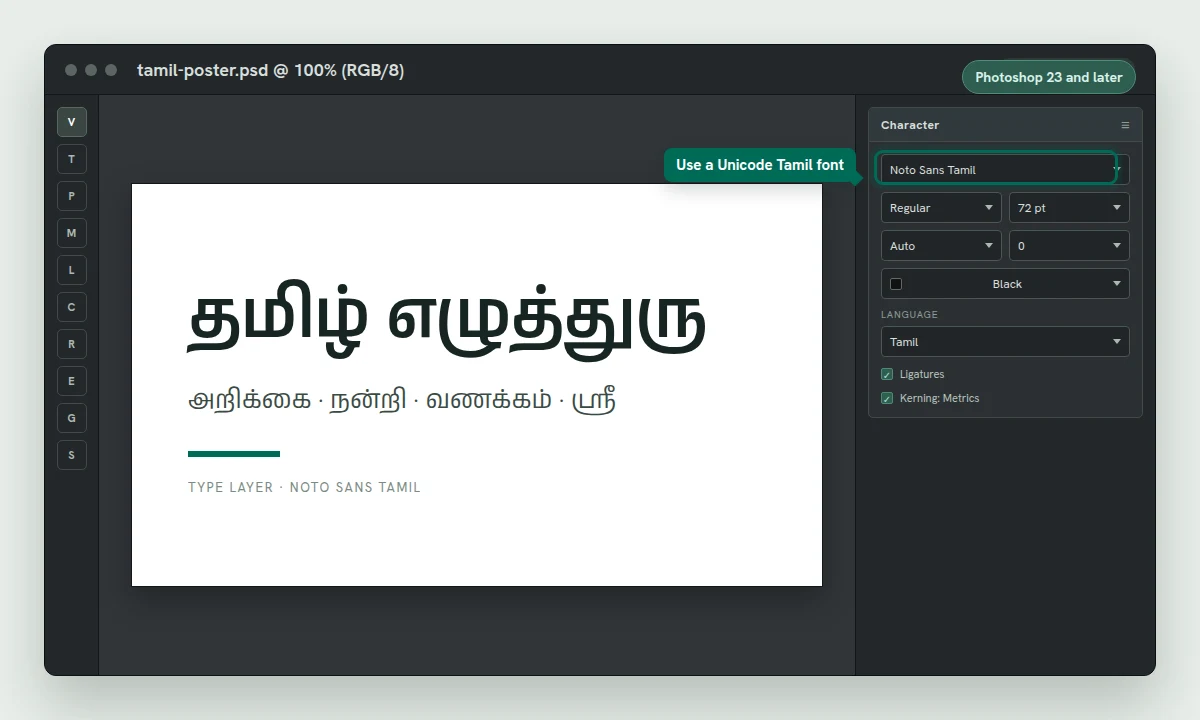
Photoshop 23 and Later
Photoshop 23.0, released in October 2021, replaced the old language-specific engines with the Unified Text Engine. It uses HarfBuzz for shaping, so Tamil works without turning on a World-Ready layout. New type layers support all scripts by default.
Update Photoshop to version 23.0 or later.
Install a Unicode Tamil font. On Windows, Noto Sans Tamil or Nirmala UI is enough; the font installation guide covers the other platforms.
Select the Type tool, create a type layer, and type or paste Unicode Tamil.
In the Character panel, choose the Tamil font. Setting the Language menu to Tamil is useful for hyphenation and spell check, but it does not control shaping. The Unified Text Engine shapes the script automatically.
If an old document still uses a legacy text engine, you can switch that layer with the composer option in the Paragraph panel flyout menu. For new work, leave it on the default.
Tamil in Photoshop gets correct shaping and common type attributes. Advanced OpenType features that Photoshop exposes for Latin, Arabic and Japanese are not available for Tamil. If the letters are correct but the typography looks plain, that is the expected level of support, not a broken font.
Photoshop 22 and Earlier
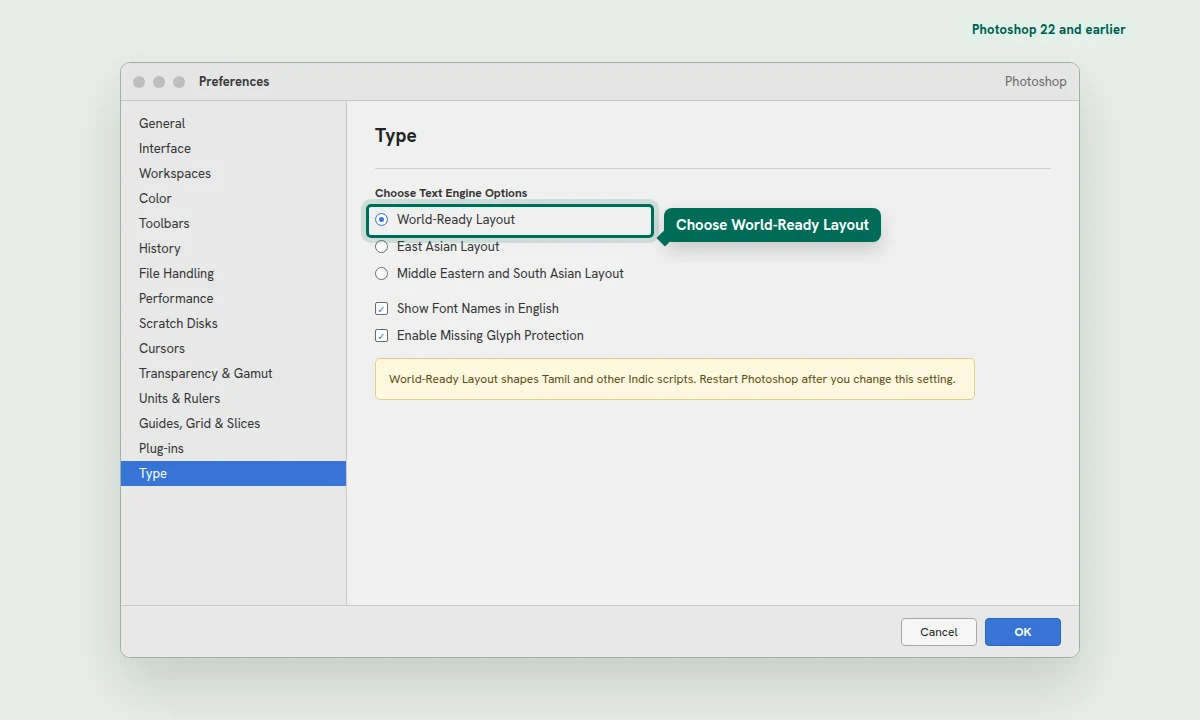
Older Photoshop versions split text handling between a Latin engine and a World-Ready engine. Tamil needs the World-Ready engine. The setting is a preference, so you have to restart Photoshop before it takes effect.
On Windows, open Edit > Preferences > Type. On Mac, open Photoshop > Preferences > Type.
In the Choose Text Engine Options section, select World-Ready Layout.
Click OK and restart Photoshop.
Create a new type layer, choose a Unicode Tamil font, and paste the Tamil text again. Rebuilding the layer is more reliable than repairing an old one.
If an old document still shows broken Tamil after the restart, select the type layer and use the Paragraph panel flyout menu to choose the World-Ready composer for that layer. Then replace the legacy font with a Unicode Tamil font.
Illustrator
Illustrator supports Tamil through its Middle Eastern and South Asian composers, but the composer is hidden until you enable the Indic options. Turning on the language alone is not enough.
On Windows, open Edit > Preferences > Type. On Mac, open Illustrator > Preferences > Type.
Select Show Indic Options. You cannot enable the Indic and East Asian options at the same time, so turn off East Asian options if they are on.
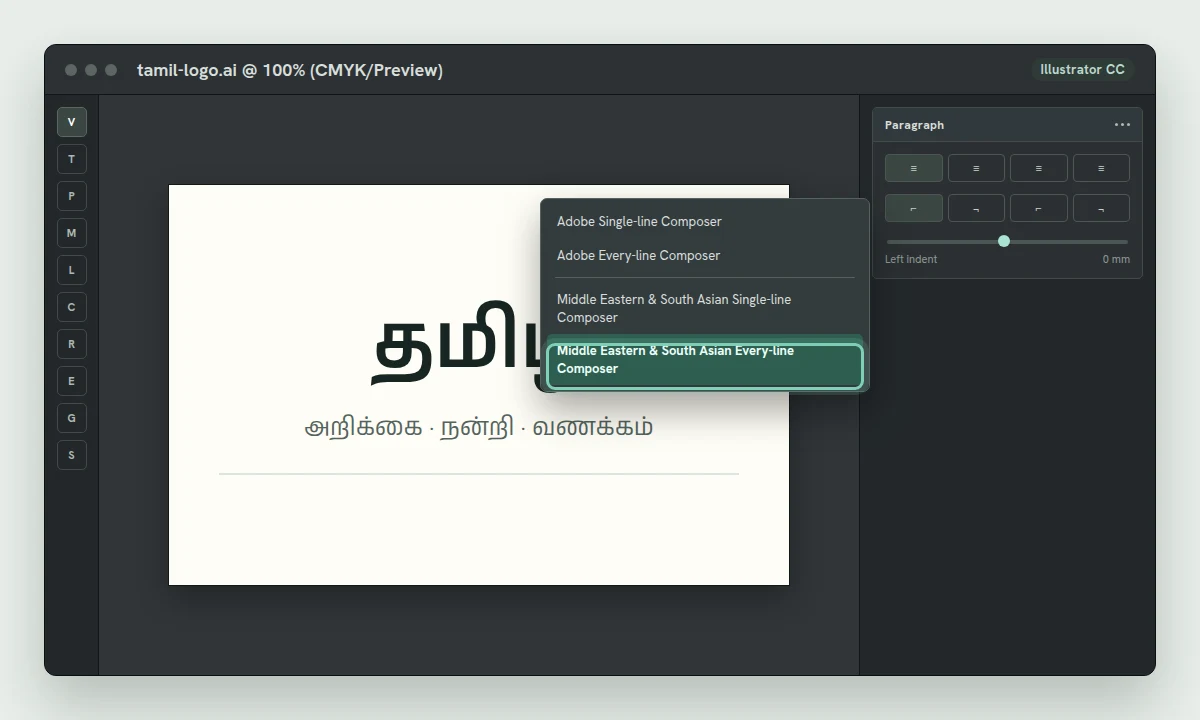
Select the Tamil text, open Window > Type > Paragraph, then open the Paragraph panel menu.
Choose Middle Eastern & South Asian Single-line Composer for a heading, or Middle Eastern & South Asian Every-line Composer for a paragraph.
Set the Character panel language to Tamil and choose a Unicode Tamil font. The language affects hyphenation and spelling; the composer affects shaping.
Premiere Pro and After Effects
Premiere Pro 22.1.1 and After Effects 22.1.1, both from December 2021, introduced the Universal Text Engine. It shapes Middle Eastern and South Asian scripts without a separate engine preference, and the old Text Engine option was removed.
Premiere Pro: create a text graphic with the Type tool, choose a Unicode Tamil font, and type or paste Tamil. Direction controls for South Asian scripts are in the Essential Graphics panel.
After Effects: create a new text layer, choose the Tamil font, and paste the text. If an older text layer still breaks, rebuild the layer rather than hunting for a removed preference.
Both apps: a legacy font will still produce Latin text. Convert the text to Unicode before you bring it into the timeline or composition.
CorelDRAW
CorelDRAW stores new text as Unicode and converts the encoding of imported drawings. When an older drawing displays Tamil incorrectly, CorelDRAW can re-encode the selected text object.
Select the text object with the Text tool.
Choose Text > Text Encode.
Select Other encoding and choose the encoding that makes the preview readable.
Apply a Unicode Tamil font after the text is readable.
This fixes encoding, not shaping. If the letters are readable but still reorder or detach, CorelDRAW is not composing the script correctly for that object. Compose the Tamil in Illustrator or InDesign and place it as artwork. Do not convert broken text to curves: that locks in the error.
Canva
Canva shows boxes or an x when the selected font does not support the language setting of the design. The fix is to choose a font that Canva lists for Tamil, not to upload a random Tamil-looking font.
Open the design and select the text box that is not displaying correctly.
Open the font dropdown in the toolbar and choose See all.
Scroll to Fonts in your language, below Recently used, Brand fonts and Popular fonts.
Choose a Tamil font to apply it to the selected text box.
If you uploaded your own font and it still shows boxes, the font may lack Tamil glyphs or fail Canva's upload checks. Try a Canva Tamil font first to separate a font problem from a text problem.
PixelLab
PixelLab is an Android app, and it does not publish a desktop-style manual. Its font picker includes a place to add your own font file, usually under My Fonts, but the icon and label change between versions.
Import a .ttf or .otf Unicode Tamil font, apply it to a text layer, and paste Unicode Tamil. A Bamini font will still display Latin letters because the underlying text is Latin. If the app shows boxes, the imported font probably lacks Tamil glyphs, so try Noto Sans Tamil.
Why Tamil Still Breaks
| Check | What it means | What to do |
|---|---|---|
| The text is legacy | The letters are Latin characters that only look Tamil with Bamini applied. | Convert the text to Unicode, then apply a Tamil font. |
| The font lacks Tamil | The font is a Latin-only or incomplete Tamil font. | Switch to Noto Sans Tamil, Nirmala UI or Latha. |
| The app is old | Photoshop 22 or earlier, or an old Illustrator setup without Indic options. | Enable World-Ready Layout or the South Asian composer, or update the app. |
| The layer is old | A text layer was created with a legacy engine and still uses it. | Create a new layer and paste the Unicode text again. |
| The text is an image | The Tamil is a screenshot or outlined artwork, not live text. | Use the original text file; retyping from an image is not reliable. |
One last rule: keep a live-text version of the design until the Tamil is correct. Outlining is a final production step, not a repair step. If you need to move the design to an app without Tamil support, place a flattened image or a PDF instead of outlining broken text.