How to Install Tamil Fonts on Windows, Mac and Phone
தமிழ் எழுத்துருக்களை நிறுவுவது எப்படி
Installing the font is the easy part. The part that matters is choosing a Unicode Tamil font, because a legacy font can look right in a preview and then turn into English letters everywhere else.
Short answer
Download a Unicode Tamil font, then install it: right-click the file and choose Install on Windows, add it in Font Book on Mac, or copy it to ~/.local/share/fonts on Linux. On iPhone and Android you install fonts through apps. Then type Tamil and check that every letter joins correctly.
Choose Your Device
| Device | How you add a font | Who can use it |
|---|---|---|
| Windows 11 or 10 | Right-click the font file and choose Install, or drag it into Settings > Personalization > Fonts. | You, or every account with Install for all users. |
| Mac | Open the file in Font Book, or choose File > Add Fonts to Current User. | You, or every account if you install for the computer. |
| Linux | Copy the file into your fonts folder and refresh fontconfig. | You, or every user with a system folder. |
| Android | Usually only inside an app or a vendor font store, not in system settings. | That app, or that phone theme. |
| iPhone and iPad | Install a font app from the App Store, then open it to install its fonts. | Apps that support custom fonts. |
| Chromebook | No native font installer. Google Docs offers extra fonts inside Docs. | Only the app that provides the font. |
Windows 11 and Windows 10
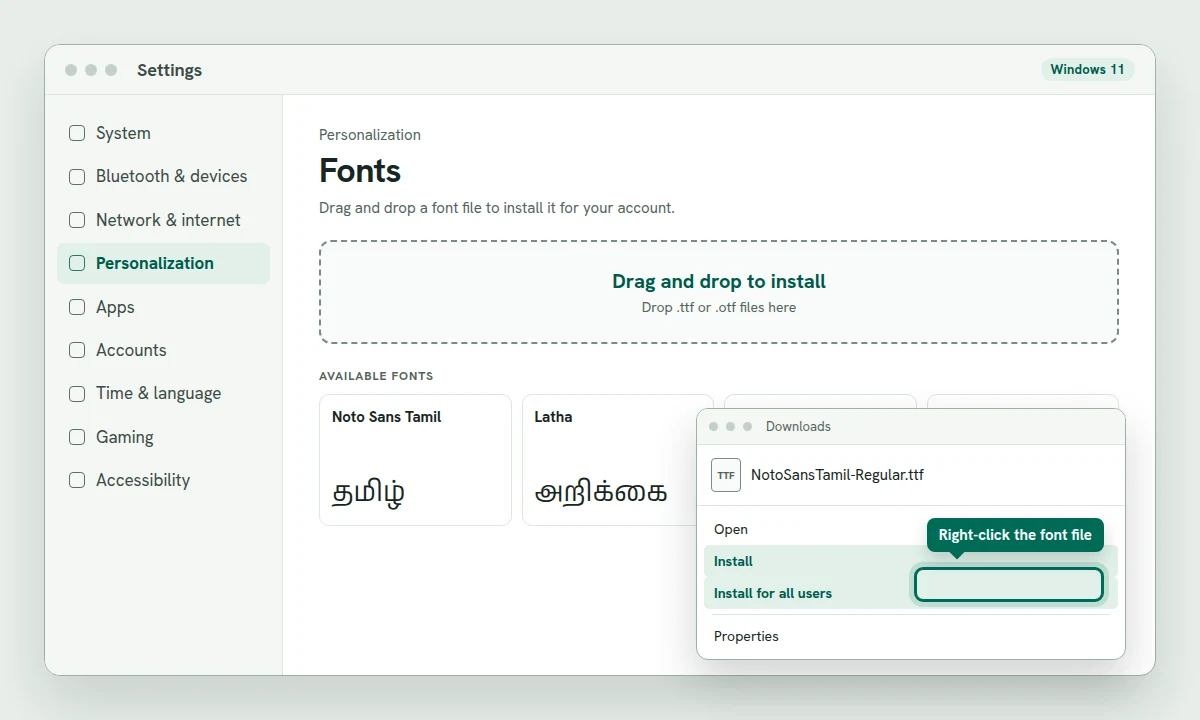
Microsoft supports two install options for a font file: Install for your account and Install for all users for the whole computer. Neither needs a third-party installer.
Download a
.ttfor.otfTamil font. If it arrives as a.zip, right-click the zip and choose Extract All first.Right-click the font file and choose Install. To make it available to every account, choose Install for all users and approve the administrator prompt.
You can also open Settings > Personalization > Fonts and drag the font file onto the page. Windows shows the font under Available fonts when it is installed.
Restart the app that needs the font. Word, Photoshop and other programs usually build their font menu at startup.
A font installed with Install goes into your own profile at %LOCALAPPDATA%\Microsoft\Windows\Fonts. A font installed for all users goes into C:\Windows\Fonts. That difference matters on a shared computer, and it also explains why a font can appear in one account and not another.
If Word or Another App Still Does Not List the Font
Check the app is not running as administrator while the font was installed for your account only. Programs running with elevated rights read the all-users font list, not your personal one. Install the font again with Install for all users, or close the elevated app and open it normally.
Tamil Supplemental Fonts on Windows
Windows 11 can add Latha and Vijaya as an optional feature. Open Settings > System > Optional features > View features, search for Tamil Supplemental Fonts, and install it. On Windows 10 the same package is under Settings > Apps > Optional features > Add a feature. These fonts are useful for older documents that name Latha or Vijaya, but they are not required for Tamil to display.
Mac
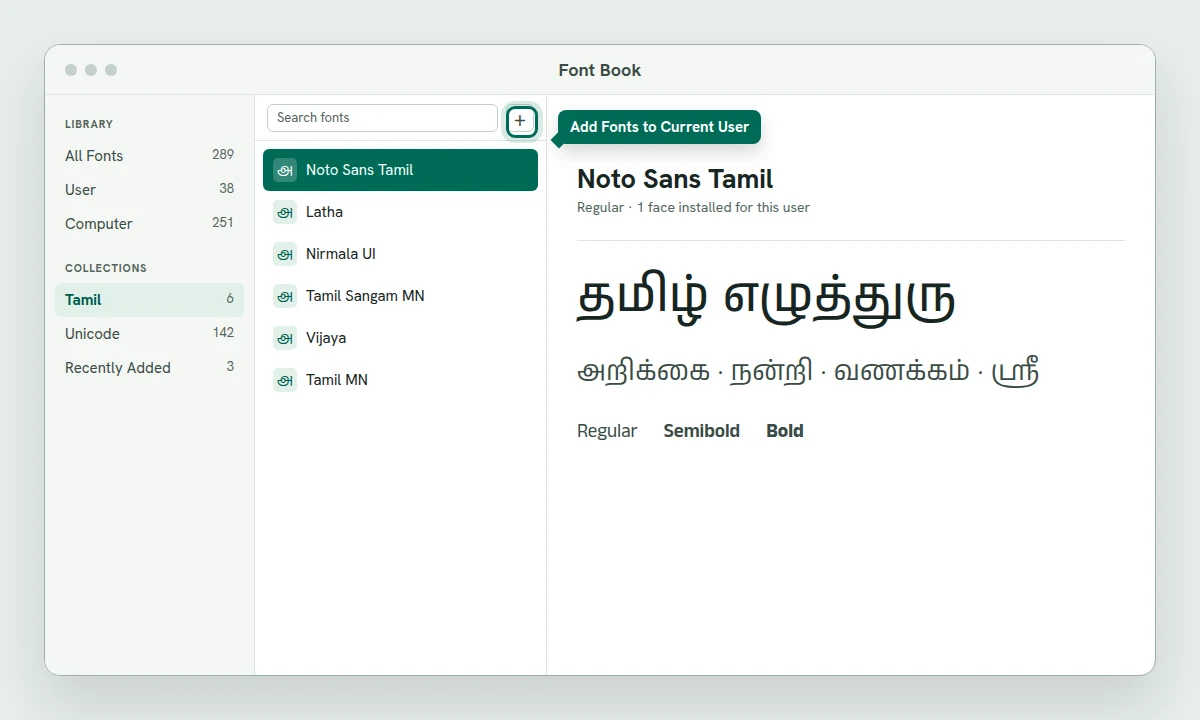
macOS uses Font Book for fonts, and Apple documents four ways to add one: the File menu, dragging the file onto the Font Book window, dragging it onto the Font Book icon in the Dock, or double-clicking the file in Finder and choosing Install.
Open Font Book from Applications or Spotlight.
Choose File > Add Fonts to Current User and select the font file. You can also drag the file into the Font Book window.
Font Book validates the file and warns you about duplicate or damaged fonts. Read the warning before you continue.
Quit and reopen the app that needs the font.
To install for every account on the Mac, choose File > Add Fonts to Computer and enter an administrator password. You can also set the default install location in Font Book > Settings. Current-user fonts live in ~/Library/Fonts; all-user fonts live in /Library/Fonts.
Linux
Linux desktops use fontconfig. Copying a font into the right folder and rebuilding the cache makes it available without a special installer.
Create your personal font folder if it does not exist:
mkdir -p ~/.local/share/fonts.Copy the font file into it:
cp NotoSansTamil-Regular.ttf ~/.local/share/fonts/.Rebuild the font cache:
fc-cache -f -v.Check that fontconfig can see it:
fc-list | grep -i tamil. The font name should appear in the output.Restart the app. If it still does not appear, log out and back in.
For every user on the machine, put the file in /usr/local/share/fonts with sudo and run sudo fc-cache -f -v. The GNOME Fonts app is a viewer and manager; it is not required for the copy-and-refresh method.
iPhone and iPad
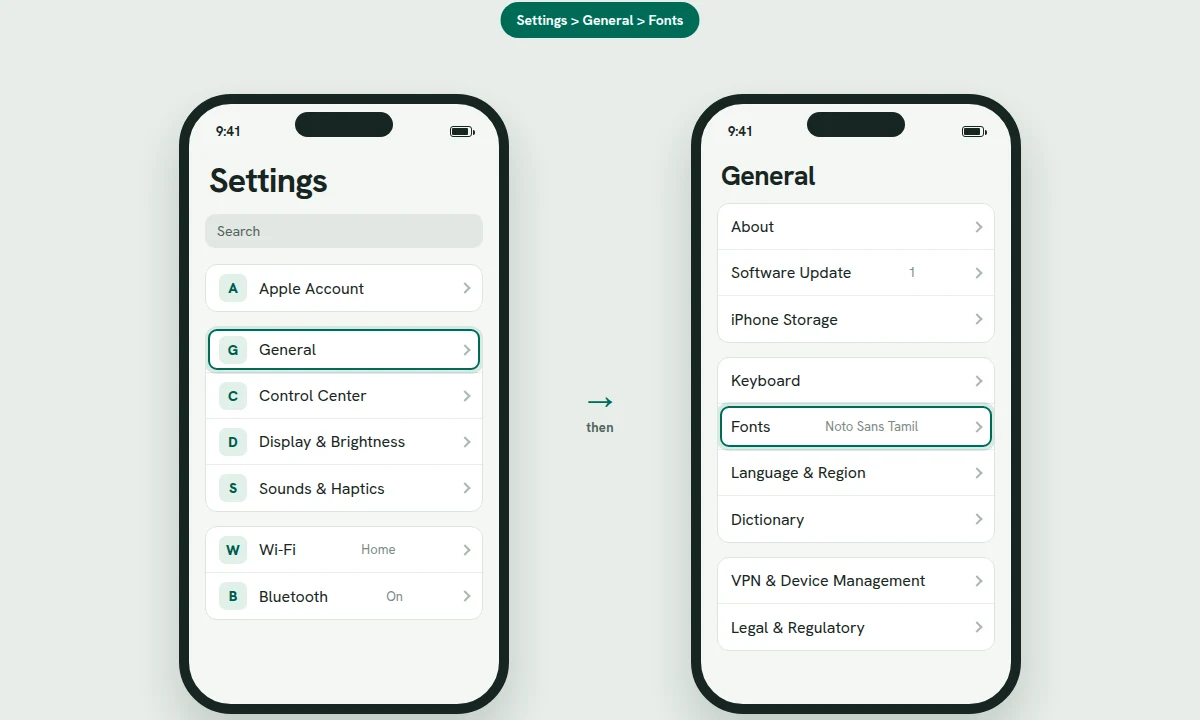
iOS and iPadOS do not let you add a font file to system settings directly. Font apps from the App Store install their fonts, and the fonts then appear under Settings > General > Fonts. Only apps that support custom fonts can use them, so a newly installed font will not change the system interface or every app.
Install a font app from the App Store and open it.
Use the app to install the Tamil font. Some apps do this through a configuration profile; if you see Profile Downloaded, open Settings, tap it, and follow the install steps.
Check Settings > General > Fonts to confirm the font is listed.
Open the app where you want to use it, such as Pages or Keynote, and choose the font from that app's font picker.
Android
Most Android phones do not allow you to install an arbitrary font file as a system font. The font picker in Settings is controlled by the phone maker, and changing system fonts usually means using the vendor's theme store, not a .ttf from a website.
Samsung: open Settings > Display > Font size and style > Font style > Download fonts and install a font from the Galaxy Store. This changes the phone theme, not the font inside every app.
Design apps: PixelLab and similar apps can import a
.ttfor.otffor their own text layers. The font is available only inside that app.Documents: Google Docs and Word for Android use their own font lists. If the Tamil font you want is not there, create the document on a computer and open it on the phone, or export a PDF.
Android itself already includes Tamil fallback fonts, so Tamil text in a normal app should display without installing anything. Boxes on Android usually mean the app is using a font that lacks Tamil glyphs, not that the phone needs a system font.
Chromebook
ChromeOS has no font installer in Settings. You cannot add a .ttf to the Chromebook system and use it in Chrome, Android apps or the Files app. The workaround is the Linux development environment: fonts installed there are available to Linux apps, but not to Chrome tabs or Android apps.
For documents, use Google Docs. Open the font menu, choose More fonts, search for a Tamil font such as Noto Sans Tamil, and add it. The font belongs to your Google account and travels with Docs, Slides and Sheets, but it is not a system font.
If You Only Need the Font Inside Microsoft Office
Microsoft 365 has cloud fonts. With an internet connection, the fonts appear in the font menu in supported Office apps and download when you use them, so the document renders correctly on another device with Microsoft 365. On Windows, cloud fonts require File > Account > Manage Settings and Optional connected experiences to be on.
Cloud fonts are not installed in Windows. Photoshop, Canva and other non-Office apps cannot see them, and older Office versions may not render them. If you need the font outside Office, install the font file normally.
Check That the Font Is Really Unicode
A font preview is not a reliable test. Legacy fonts such as Bamini place Tamil-shaped glyphs on English keys, so a preview can look like Tamil even though the text is stored as Latin letters. The test is to apply the font to real Unicode Tamil and see whether the letters join correctly.
Type or paste this sample, apply the new font, and check the shapes:
தமிழ் எழுத்துரு சரியாக உருவாகிறதா? கொ டோ ஸ்ரீ க்ஷ நன்றி
If the sample breaks, the font is not a good Unicode Tamil font or the app is not shaping Tamil. If you paste Bamini text into a Unicode font and see Latin letters such as jkpo;, the text is legacy, not Unicode. Convert it with the Bamini to Unicode converter before you change the font.
Where the Font Goes
| System | This account | Every account |
|---|---|---|
| Windows | %LOCALAPPDATA%\Microsoft\Windows\Fonts | C:\Windows\Fonts |
| Mac | ~/Library/Fonts | /Library/Fonts |
| Linux | ~/.local/share/fonts | /usr/local/share/fonts |
If a font is in the right folder but an app still refuses to show it, restart the app first, then the computer. On Windows, a font installed for one account is invisible to another account and to elevated programs; that is the most common reason a font "disappears" when you open a different app.