Guides

Tamil Keyboard for Windows 10: Setup Guide

விண்டோஸ் 10 இல் தமிழ் தட்டச்சு

The Windows 10 menus, the layouts Windows 10 has, and the fixes that differ from Windows 11.

Updated By TypeTamilOnline EditorialHow we check guides

Short answer

Open Settings > Time & Language > Language, add Tamil, then select Tamil > Options > Add a keyboard. Choose Tamil Phonetic for English-letter typing, Tamil 99 or Tamil (InScript). Windows 10 has no Tamil Anjal. Press Windows + Space to switch.

Support notice: Windows 10 reached end of support on 14 October 2025. Microsoft says the PC still works, but it no longer gets free updates, technical help or security fixes, and Microsoft recommends Windows 11. The keyboard steps below are unchanged. On Windows 11, follow our Windows 11 Tamil keyboard guide instead.

What Is Different on Windows 10

The Tamil keyboards behave the same on both versions. The menus and one layout differ:

ItemWindows 10Windows 11
Language settingsSettings > Time & Language > LanguageSettings > Time & language > Language & region
Open Tamil’s optionsSelect Tamil, then the Options buttonThe … menu next to Tamil, then Language options
Phonetic dictionaryDownload under Basic typingDownload next to Basic typing, under Language features
Advanced keyboard settingsSettings > Devices > TypingSettings > Time & language > Typing
Tamil Anjal layoutNot includedIncluded (00030449)

Windows 10 includes Tamil Phonetic (type English letters, pick a Tamil suggestion), Tamil 99 (00020449) and Tamil, the InScript layout (00000449). Not sure which to pick? The layout comparison in the Windows 11 guide applies to Windows 10 as well; leave out Anjal.

Add Tamil on Windows 10

  1. Open Start > Settings > Time & Language > Language.
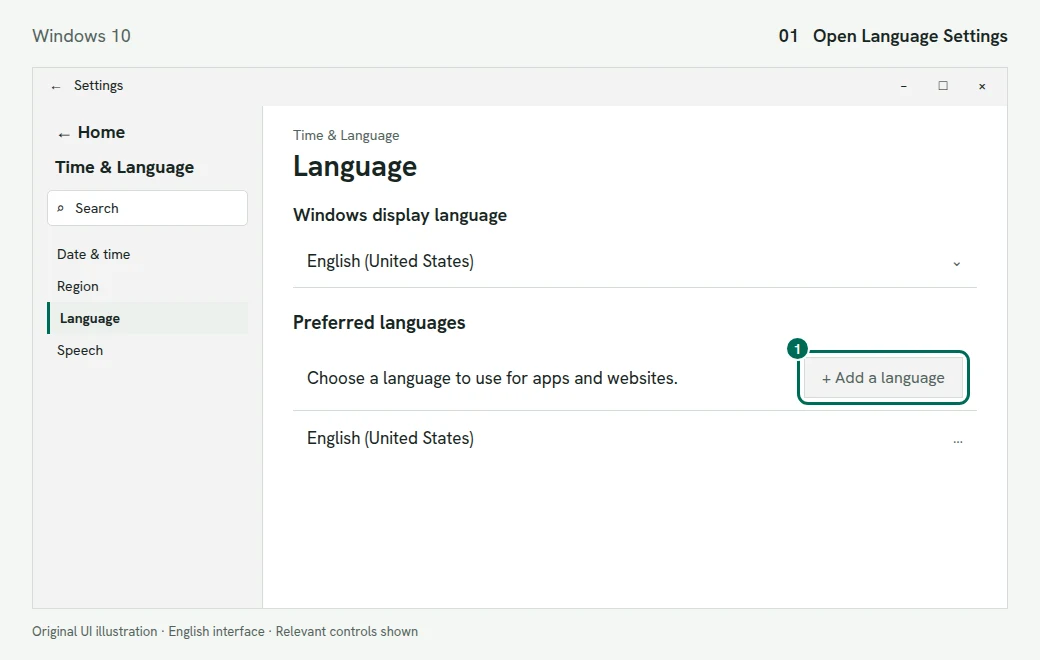
    Settings with its left navigation and Add a language outlined in green with callout 1
    1. Find Add a language in Preferred languages. Illustration of the Windows 10 screen
  2. Under Preferred languages, select Add a language. Search for Tamil, select it, then Next. Leave Set as my Windows display language unticked to keep Windows in English, then select Install.
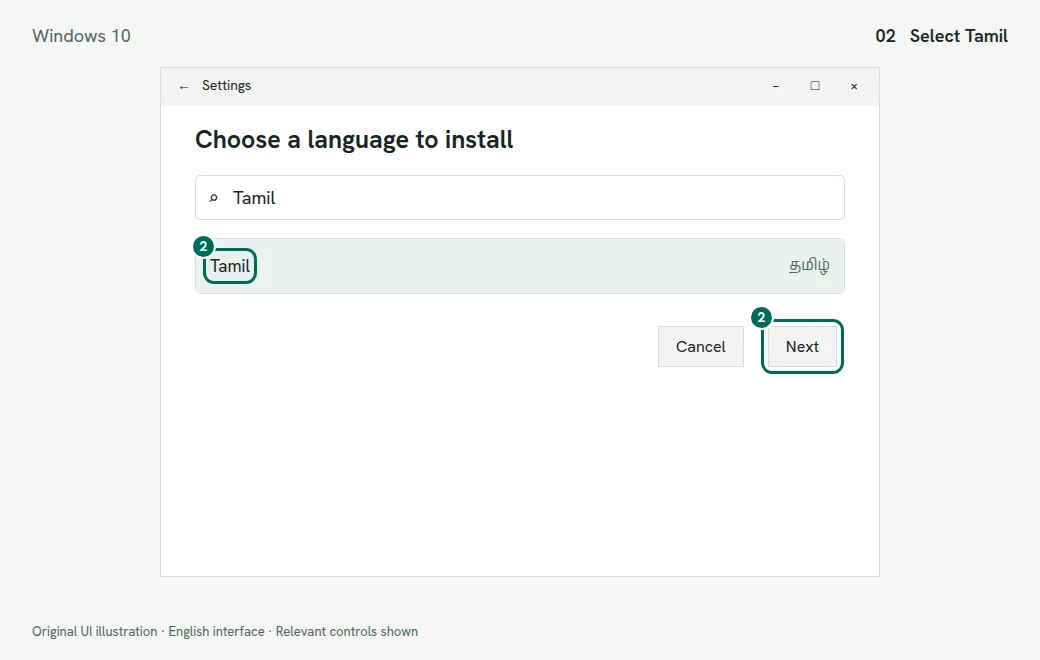
    Choose a language to install dialog with Tamil selected and Next highlighted
    2. Search for Tamil and select Next. Illustration of the Windows 10 screen
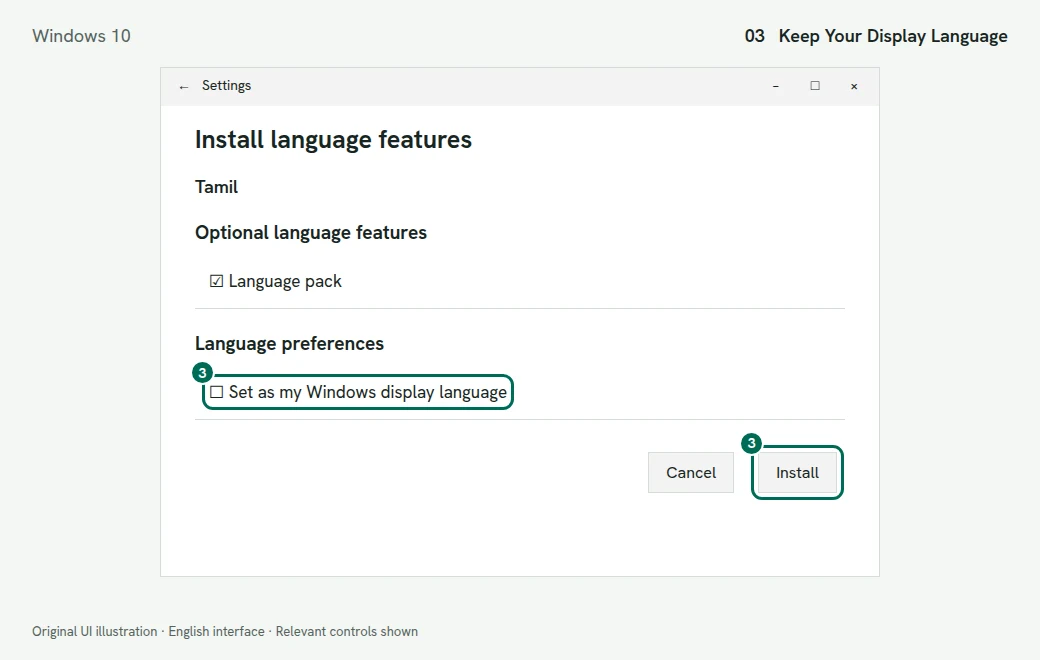
    Install language features dialog with the display-language checkbox unselected and Install highlighted
    3. Review language preferences before selecting Install. Illustration of the Windows 10 screen
  3. Back in Language, select Tamil, then Options. Under Keyboards, select Add a keyboard.
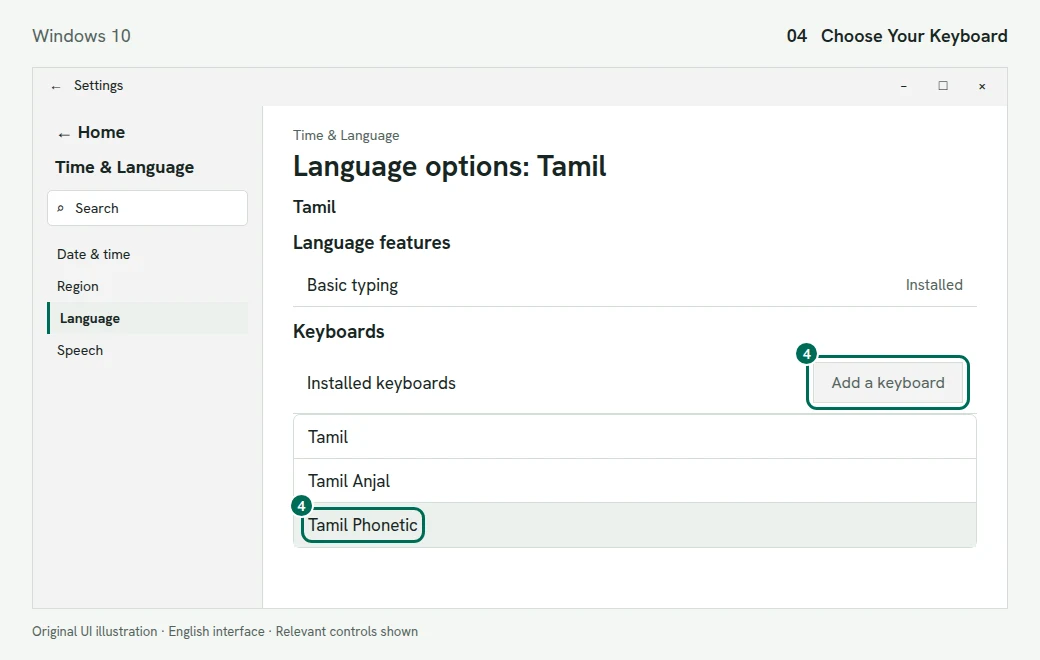
    Tamil language options with Add a keyboard and Tamil Phonetic outlined in green
    4. Add Tamil Phonetic from the keyboard list. Illustration of the Windows 10 screen
  4. Choose Tamil Phonetic, Tamil 99 or Tamil. You can add more than one.
  5. Press Windows + Space and select the full keyboard name. Tamil Phonetic and Tamil 99 can share one Tamil indicator in the taskbar, so read the name before you type.
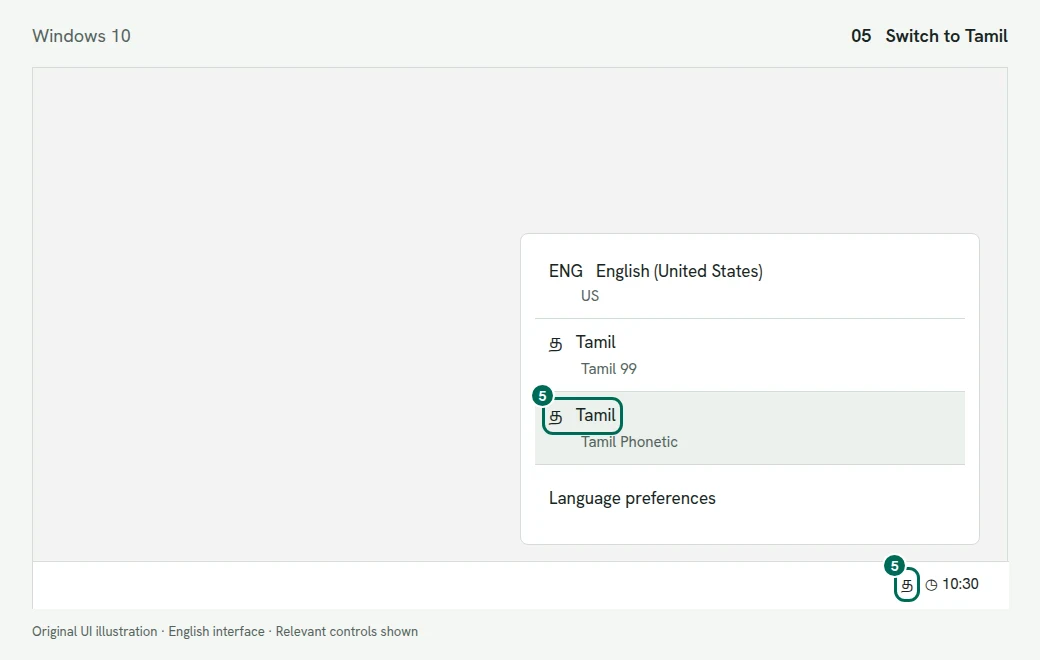
    Windows input flyout with Tamil Phonetic highlighted above the taskbar input indicator
    5. Select the full keyboard name with Windows + Space. Illustration of the Windows 10 screen

Check It Works

With Tamil Phonetic active, type thottam and press Enter on the suggestion தோட்டம் (garden). With Tamil 99, Microsoft’s worked example types the same word with l x o f o k f. Practice keys for each layout are in the Windows 11 guide, our Tamil99 keyboard and the InScript chart.
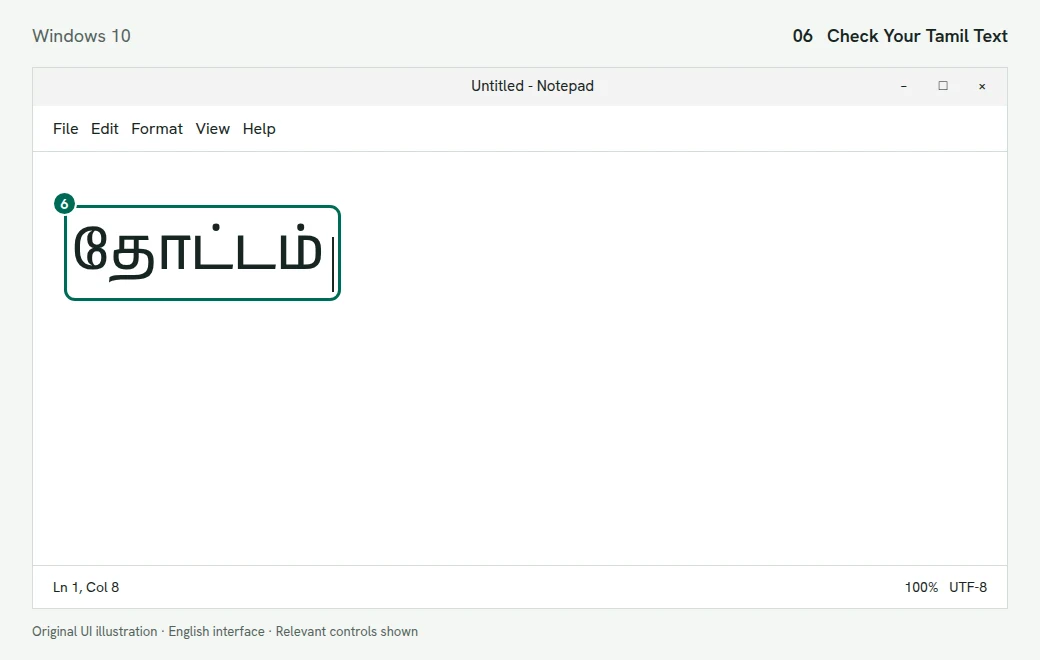
Notepad-style document with the Unicode Tamil word தோட்டம் and an insertion caret highlighted
6. Check the accepted word in a plain-text document. Illustration of the Windows 10 screen

Windows 10 Fixes

“Tamil IME Is Not Ready Yet”

The Tamil Phonetic dictionary is still downloading through Windows Update. To start it yourself, open Settings > Time & Language > Language, select Tamil, then Options, and select Download under Basic typing. Microsoft says that if Basic typing has no Download button, the dictionary is already installed.

Tamil Anjal Is Not in the List

That is expected: Anjal arrived with Windows 11. Use Tamil Phonetic, or see our Tamil typing software guide for third-party layouts.

Ctrl + Shift or Alt + Shift Switches Unexpectedly

Open Settings > Devices > Typing and, under More keyboard settings, select Advanced keyboard settings. Open Language bar options > Advanced Key Settings, select Between input languages, then Change Key Sequence, and set unwanted shortcuts to Not Assigned.

Other Problems

Missing keyboards, boxes in Word and the old Tamil Indic Input 3 download work the same way on both versions. See Fix Tamil Keyboard Problems in the Windows 11 guide.

Questions People Ask

Is Tamil Anjal available on Windows 10?

No. Microsoft lists Tamil Anjal as a keyboard introduced in Windows 11. On Windows 10, use Tamil Phonetic for English-letter typing, or our Tamil typing software guide for third-party options. Anjal and Tamil Phonetic are separate methods, so do not use the names interchangeably when checking software requirements.

Does the Tamil keyboard still work after Windows 10 end of support?

Yes. Microsoft says a Windows 10 PC still works after 14 October 2025; it no longer gets free updates, technical help or security fixes. Keyboards you already added keep working, but Microsoft recommends moving to Windows 11. Use the current Microsoft lifecycle guidance when planning work on an older computer.

Do I need a Tamil keyboard download for Windows 10?

No separate installer is needed. Tamil, Tamil 99 and Tamil Phonetic are built in. Only the Tamil Phonetic dictionary downloads, through Windows Update. After installation, select the intended input source rather than changing your document font. Use the matching chart for fixed layouts and review candidates when typing with Tamil Phonetic.

Will adding Tamil change Windows 10 to Tamil?

Not unless you tick Set as my Windows display language in the install dialog. Leave it unticked to keep menus in English. After adding the language, choose its input source when typing and return to English for other text. Keyboard selection and display-language selection are separate settings.

Can I type Tamil without changing Windows settings?

Yes. Use our online Tamil typing tool and copy the result. Keep the Windows keyboard on English while you use it. The page handles the conversion in its editor; it does not install a keyboard for other programs. Copy the finished passage into the destination document and keep a saved copy.

Where do I add another Tamil layout in Windows 10?

Open Settings > Time & Language > Language, select Tamil under Preferred languages, then open Options > Add a keyboard. Choose the layout you intend to learn. Keep both English and Tamil installed so you can switch back for passwords and English text. For the newer Settings interface, use the Windows 11 guide instead.

How do I remove an unwanted Tamil layout from Windows 10?

Open Tamil’s language Options in Windows Settings, select the unwanted entry under Keyboards, and choose Remove. Keep the layout you actually use, and check the input menu afterwards. Removing a keyboard layout is different from deleting the whole Tamil language entry. If Remove is unavailable, first make sure another keyboard is available for your account.

Why are Tamil Phonetic suggestions missing on my Windows 10 PC?

Check whether the phonetic dictionary has finished downloading. In Tamil’s language options, look under Basic typing and select Download if it is offered. Windows Update supplies the dictionary. Also confirm that Tamil Phonetic is active, rather than Tamil or Tamil 99, which use fixed positions. Changing the document font will not turn a fixed keyboard into a suggestion-based input method.

How can I tell whether Windows 10 is using Tamil99 or InScript?

Read the full keyboard name in the input menu: Tamil 99 is Tamil99, while Tamil is InScript. Press Windows + Space to inspect the available entries. Match that name to your printed chart before practising. If you are using one of our online layout tools, switch Windows back to English and let the page handle the keys.

Can a Windows 10 Tamil keyboard produce old Bamini document codes?

The built-in Tamil keyboards covered here produce Unicode Tamil, so they are not a substitute for legacy Bamini encoding. Compose in Unicode and use the Unicode to Bamini converter if the recipient explicitly needs Bamini. For direct legacy entry, consult the software guide. Confirm the requested encoding before changing fonts in an old template.

Sources

Every step on this page was checked against these official pages on . Menu names can change with software updates. If yours look different, tell us.

  1. Microsoft Support: Language and Keyboard Settings (Windows 10 Tab) support.microsoft.com
  2. Microsoft Support: Indic Phonetic Keyboards and Dictionary Downloads support.microsoft.com
  3. Microsoft Learn: Keyboard Names, Identifiers and Windows Versions learn.microsoft.com
  4. Microsoft Learn: Tamil Input and Worked Examples learn.microsoft.com
  5. Microsoft Learn: Windows 10 Home and Pro Lifecycle learn.microsoft.com